<?xml version="1.0" encoding="utf-8"?><feed xmlns="http://www.w3.org/2005/Atom" xml:lang="en"><generator uri="https://jekyllrb.com/" version="3.10.0">Jekyll</generator><link href="https://crobmaster.github.io/feed.xml" rel="self" type="application/atom+xml" /><link href="https://crobmaster.github.io/" rel="alternate" type="text/html" hreflang="en" /><updated>2026-10-29T07:57:41+00:00</updated><id>https://crobmaster.github.io/feed.xml</id><title type="html">Crob Apps Dev Blog</title><subtitle>Development notes from Crob Apps — Godot, mobile game dev, and the occasional detour, written up as they happen.</subtitle><author><name>Crobmaster</name><email>crobmaster@gmail.com</email></author><entry><title type="html">Identical Achievement Icons Block Publishing on Google Play Games</title><link href="https://crobmaster.github.io/blog/gpgs-identical-achievement-icons-block-publishing/" rel="alternate" type="text/html" title="Identical Achievement Icons Block Publishing on Google Play Games" /><published>2026-09-17T00:00:00+00:00</published><updated>2026-09-17T00:00:00+00:00</updated><id>https://crobmaster.github.io/blog/gpgs-identical-achievement-icons-block-publishing</id><content type="html" xml:base="https://crobmaster.github.io/blog/gpgs-identical-achievement-icons-block-publishing/"><![CDATA[<p>The short version fits in three bullets:</p>

<ul>
  <li><strong>If every achievement shares the same icon, publishing your Play Games Services configuration is blocked outright.</strong> Not a warning — the button is disabled.</li>
  <li>Icons <em>are</em> editable afterwards, including after publishing — but <strong>only one achievement at a time, by hand, in Play Console.</strong></li>
  <li><strong>Every bulk path is closed.</strong> Bulk import is create-only, and the Publishing API explicitly ignores writes to <code class="language-plaintext highlighter-rouge">iconUrl</code>.</li>
</ul>

<p>I didn’t know any of that when I bulk-imported 110 achievements for <em>Tap Tap Picture Book</em> pointing at a single placeholder icon, and I found out at the last step before publishing. Getting out of it cost me every achievement ID and a re-release of the app.</p>

<p>This is the sequel to <a href="/blog/gpgs-achievement-import-failure/">Debugging a Silent Google Play Games Services Achievement Import Failure</a>, which covers getting the same bulk import to succeed in the first place.</p>

<h2 id="where-it-went-wrong">Where it went wrong</h2>

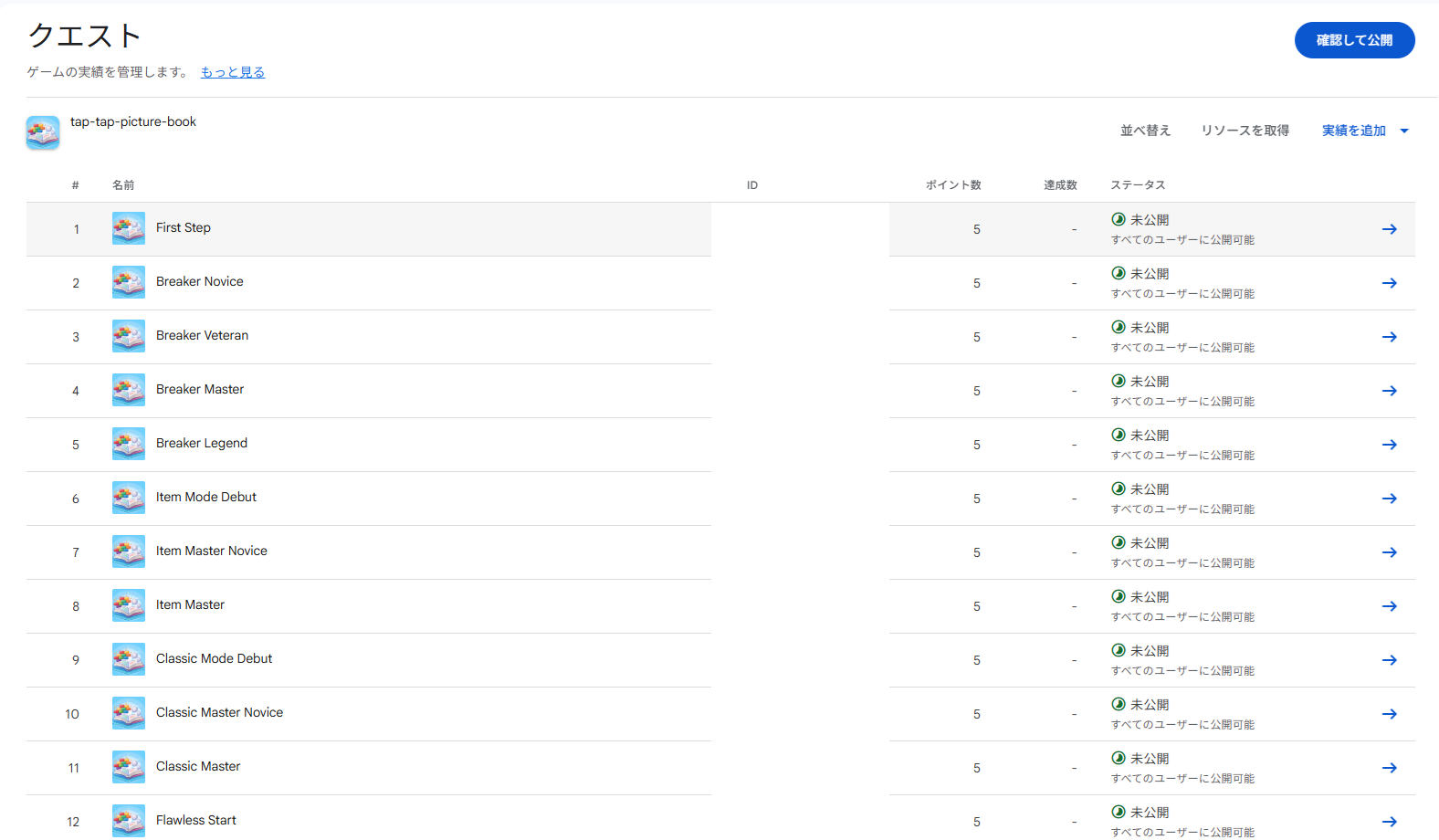
<p>I created all 110 achievements through the bulk-import CSV flow, and deliberately deferred the icons: every row pointed at the same placeholder PNG, a recolored copy of the app icon. My reasoning was that icons are cosmetic and editable later in Play Console, without redistributing the app.</p>

<p>That part was correct. What I hadn’t checked was whether the placeholder state itself was allowed to exist.</p>

<figure>
  <img src="/assets/images/posts/gpgs-achievement-import-failure/achievements-list.png" alt="Play Console achievements list showing many achievements — First Step, Breaker Novice, Breaker Veteran and more — all displaying the identical placeholder icon." />
  <figcaption>All 110 achievements, all wearing the same placeholder icon. (Play Console is in Japanese here — my account's console language.)</figcaption>
</figure>

<p>Implementation went fine. Device testing went fine. Closed testing went fine. Then I opened the publish screen for the final step and found this:</p>

<blockquote>
  <p>Quests
Action required: 110 items</p>

  <p>The same icon is used for multiple achievements. Specify a different icon for each achievement.</p>
</blockquote>

<p>And the <strong>Publish button was disabled</strong>. Not a warning — a hard block.</p>

<p>So the icons weren’t a cosmetic detail I could finish after launch. They were a precondition for launching at all, and I now needed to fix 110 of them.</p>

<h2 id="looking-for-a-bulk-fix">Looking for a bulk fix</h2>

<p>What I wanted was to replace 110 icons in one operation. I tried three routes; the first two don’t exist, and the third only works one achievement at a time.</p>

<h3 id="route-1-re-upload-a-bulk-zip-with-only-the-icons">Route 1: re-upload a bulk ZIP with only the icons</h3>

<p>A bulk achievement import is a ZIP containing four kinds of file:</p>

<div class="language-plaintext highlighter-rouge"><div class="highlight"><pre class="highlight"><code>AchievementsMetadata.csv        achievement definitions
AchievementsLocalizations.csv   per-language names and descriptions
AchievementsIconsMappings.csv   achievement name -&gt; icon filename
achievement_*.png               the icons (flat, at the ZIP root)
</code></pre></div></div>

<p>Because the icon mapping is its own separate file, it looks like you could re-upload just that piece. You can’t:</p>

<blockquote>
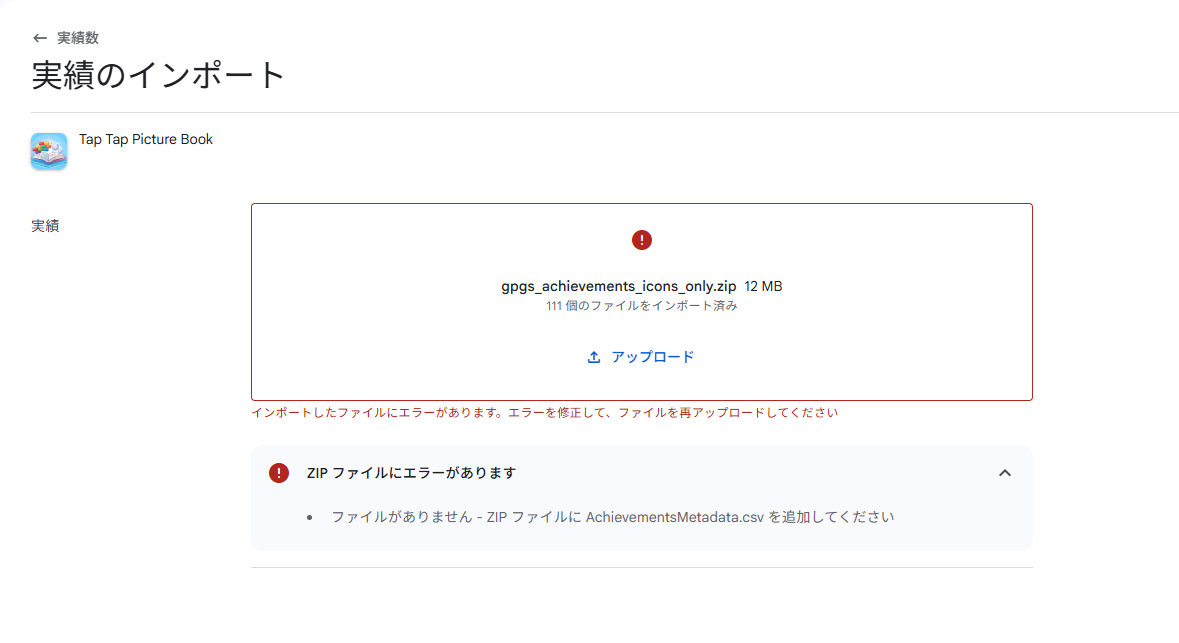
  <p>There are errors in the ZIP file
Missing file — add AchievementsMetadata.csv to the ZIP file</p>
</blockquote>

<figure>
  <img src="/assets/images/posts/gpgs-identical-achievement-icons-block-publishing/import-missing-metadata.png" alt="Play Console achievement import screen rejecting an icons-only ZIP with 'There are errors in the ZIP file — Missing file: add AchievementsMetadata.csv to the ZIP file'." />
  <figcaption>An icons-only ZIP — 111 files, no metadata CSV — never gets as far as looking at the icons.</figcaption>
</figure>

<p>The metadata file is mandatory. So include everything — metadata, localizations, mappings, icons — and upload the complete ZIP instead:</p>

<blockquote>
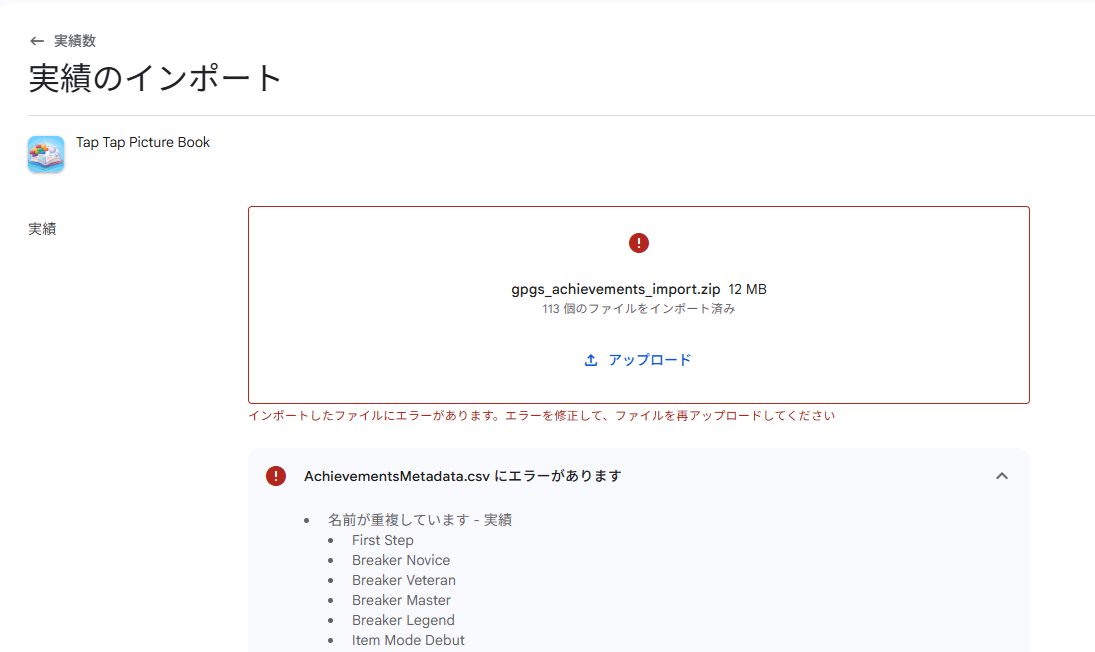
  <p>There are errors in AchievementsMetadata.csv
Duplicate name — Achievement
First Step / Breaker Novice / Breaker Veteran / … (110 rows)</p>
</blockquote>

<figure>
  <img src="/assets/images/posts/gpgs-identical-achievement-icons-block-publishing/import-duplicate-names.png" alt="Play Console achievement import screen with a red error box: the uploaded ZIP is rejected with 'There are errors in AchievementsMetadata.csv — Duplicate name — Achievement', followed by a list of achievement names starting with First Step, Breaker Novice and Breaker Veteran." />
  <figcaption>The complete ZIP uploads fine — 113 files imported — and is then rejected outright because all 110 names already exist.</figcaption>
</figure>

<p><strong>Bulk import is create-only.</strong> If a name collides with an existing achievement, the whole upload is rejected.</p>

<h3 id="route-2-the-publishing-api">Route 2: the Publishing API</h3>

<p>Play Games Services has a <a href="https://developers.google.com/games/services/publishing/">Publishing API</a>, and its overview page still advertises “uploading images for achievement and leaderboard icons.”</p>

<p>Fetch the current discovery document, though —</p>

<div class="language-plaintext highlighter-rouge"><div class="highlight"><pre class="highlight"><code>https://gamesconfiguration.googleapis.com/$discovery/rest?version=v1configuration
</code></pre></div></div>

<p>— and that method <strong>isn’t there</strong>. What remains is <code class="language-plaintext highlighter-rouge">achievementConfigurations</code> (insert / get / delete / list / update) and <code class="language-plaintext highlighter-rouge">leaderboardConfigurations</code>. The image-upload endpoint is gone.</p>

<p>The obvious fallback is to set <code class="language-plaintext highlighter-rouge">iconUrl</code> through <code class="language-plaintext highlighter-rouge">achievementConfigurations.update</code>. The schema answers that directly:</p>

<blockquote>
  <p><code class="language-plaintext highlighter-rouge">iconUrl</code>: The icon url of this achievement. <strong>Writes to this field are ignored.</strong></p>
</blockquote>

<p>Writes are ignored. There is no API path to an achievement icon.</p>

<h3 id="route-3-edit-each-achievement-by-hand-in-play-console">Route 3: edit each achievement by hand in Play Console</h3>

<p>This one works. It keeps working after you publish, too — icons aren’t frozen, they’re just not scriptable. The catch is the multiplier: 110 achievements, 110 visits to the icon picker.</p>

<h2 id="what-i-chose">What I chose</h2>

<p><strong>Deleted all 110 achievements and recreated them with icons attached</strong>, rather than clicking through 110 icon pickers.</p>

<p>That decision has a consequence that isn’t obvious until you’re in it. Recreating through bulk import only works if nothing collides, so every one of the old 110 has to be gone first — and <strong>Play Console has no bulk delete either.</strong> Choosing the scripted path for the icons is what forced me into the Publishing API for the deletion. The script wasn’t an optimization; it was the only way to carry out the decision at all.</p>

<p>First, of course, I had to produce a full set of 110 icons, no two of them identical as images — that’s the rule that started all of this. With those in hand, the rest was mechanical.</p>

<h3 id="1-delete-the-existing-110">1. Delete the existing 110</h3>

<p>Bulk import refuses to touch anything that already exists, so all 110 have to be gone before they can be recreated. Play Console deletes one achievement at a time, which puts this step right back where the icon problem was — so the Publishing API it is:</p>

<div class="language-plaintext highlighter-rouge"><div class="highlight"><pre class="highlight"><code>DELETE https://gamesconfiguration.googleapis.com/games/v1configuration/achievements/{achievementId}
scope: https://www.googleapis.com/auth/androidpublisher
</code></pre></div></div>

<p>Enable the Publishing API in Google Cloud Console, create a desktop-app OAuth client, and feed it the <code class="language-plaintext highlighter-rouge">achievement_id</code> values — which the app already has hardcoded, so no lookup is needed.</p>

<p>One snag: <strong>fire them off back-to-back and it stops around the 80th.</strong></p>

<div class="language-plaintext highlighter-rouge"><div class="highlight"><pre class="highlight"><code>FAILED achievement_XXX 403 {"error": {"code": 403,
  "message": "Rate Limit Exceeded", ... "reason": "rateLimitExceeded"}}
done ok=81 skipped=0 failed=29
</code></pre></div></div>

<p>81 deletes before the limit kicked in. Adding retry-on-403 with a wait and rerunning against just the leftovers cleared them:</p>

<div class="language-plaintext highlighter-rouge"><div class="highlight"><pre class="highlight"><code>token acquired, deleting 29
deleted achievement_XXX
...
deleted achievement_XXX
done ok=29 skipped=0 failed=0
</code></pre></div></div>

<p>There’s no need to throttle every request up front — <strong>waiting and retrying only when you actually hit the limit</strong> is enough.</p>

<p>Worth noting: this whole step has a deadline attached. <strong>After Play Games Services is published, achievements can’t be deleted at all</strong>, so the delete-and-recreate route stops existing.</p>

<h3 id="2-recreate-then-swap-every-id">2. Recreate, then swap every ID</h3>

<p>Uploading the icon-bearing ZIP creates all 110 fresh. No duplicate-name error this time, since nothing is left to collide with.</p>

<p>And <strong>every <code class="language-plaintext highlighter-rouge">achievement_id</code> changes</strong>. They share a long common prefix, so at a glance the new list looks like the old one — only the short tail differs, and that tail is what gets reassigned:</p>

<div class="language-plaintext highlighter-rouge"><div class="highlight"><pre class="highlight"><code>First Step (old) XXX...WQ
First Step (new) XXX...yAE
</code></pre></div></div>

<p>Pull the generated resource file (<code class="language-plaintext highlighter-rouge">games-ids.xml</code>) from Play Console and replace all 110 ID definitions on the app side.</p>

<p>This is where the real cost lands. <strong>Any build already in distribution now reports achievements under IDs that no longer exist, so every unlock silently fails.</strong> The closed-testing build I’d just shipped was effectively dead the moment the old achievements were deleted. Only after cutting a new version with the updated IDs could I finally publish.</p>

<h2 id="what-id-do-differently">What I’d do differently</h2>

<p><strong>Prepare the icons before creating the achievements.</strong> That’s the whole lesson. Bulk import is instant, and that instant is the only moment where icons come along for free. Skip it and there is no cheap way back.</p>

<p>Skipping that step cost:</p>

<ul>
  <li>producing 110 distinct icons anyway, just later,</li>
  <li>deleting all 110 achievements through the Publishing API, since Play Console has no bulk delete,</li>
  <li>replacing 110 achievement IDs in the app,</li>
  <li><strong>rebuilding and re-releasing the app</strong>,</li>
  <li>losing every achievement unlock from testing so far.</li>
</ul>

<p>Timing makes it worse. Once Play Games Services is published, achievements can’t be deleted at all, so recreating them in bulk stops being possible — and one-at-a-time edits in Play Console become the only way to fix an icon.</p>

<p>For reference, here’s what’s editable after creation:</p>

<table>
  <thead>
    <tr>
      <th>Item</th>
      <th>Changeable after creation</th>
    </tr>
  </thead>
  <tbody>
    <tr>
      <td>Icon</td>
      <td>Yes — one at a time in Play Console, never in bulk</td>
    </tr>
    <tr>
      <td>Name, description</td>
      <td>Yes</td>
    </tr>
    <tr>
      <td>Points, ordering</td>
      <td>Yes</td>
    </tr>
    <tr>
      <td>Adding achievements</td>
      <td>Yes</td>
    </tr>
    <tr>
      <td>Deleting achievements</td>
      <td>Only before publishing</td>
    </tr>
  </tbody>
</table>]]></content><author><name>Crobmaster</name><email>crobmaster@gmail.com</email></author><category term="android" /><category term="android" /><category term="google-play-games" /><category term="release" /><summary type="html"><![CDATA[Reusing one placeholder icon across 110 achievements blocks the Play Games Services publish outright — and every bulk path for fixing icons is closed, leaving one-at-a-time edits or a full delete-and-recreate.]]></summary><media:thumbnail xmlns:media="http://search.yahoo.com/mrss/" url="https://crobmaster.github.io/assets/images/posts/gpgs-achievement-import-failure/achievements-list.png" /><media:content medium="image" url="https://crobmaster.github.io/assets/images/posts/gpgs-achievement-import-failure/achievements-list.png" xmlns:media="http://search.yahoo.com/mrss/" /></entry><entry><title type="html">Subsetting Fonts for a Multilingual Godot Game: 5 MB Down to 0.56 MB</title><link href="https://crobmaster.github.io/blog/subsetting-fonts-for-a-multilingual-godot-game/" rel="alternate" type="text/html" title="Subsetting Fonts for a Multilingual Godot Game: 5 MB Down to 0.56 MB" /><published>2026-09-14T00:00:00+00:00</published><updated>2026-09-14T00:00:00+00:00</updated><id>https://crobmaster.github.io/blog/subsetting-fonts-for-a-multilingual-godot-game</id><content type="html" xml:base="https://crobmaster.github.io/blog/subsetting-fonts-for-a-multilingual-godot-game/"><![CDATA[<p><em>Tap Tap Picture Book</em> ships in seven languages — German, English, Spanish, French, Japanese, Korean, and Brazilian Portuguese — and the fonts that make that possible were quietly the heaviest assets in the build. Japanese and Korean fonts carry thousands to tens of thousands of glyphs, and on mobile every megabyte lands directly in the download size.</p>

<p>This post covers:</p>

<ul>
  <li>how the game subsets its fonts down to only the characters it really uses,</li>
  <li>what that saved, and</li>
  <li>the one bug that shaped how the tooling is used.</li>
</ul>

<p>For how these fonts are wired together at runtime (fallback chains, baseline fixes, emboldening), see the earlier post, <a href="/blog/cjk-font-fallback-in-godot-4/">CJK Font Fallback in Godot 4: One Theme, Three Scripts</a>.</p>

<h2 id="the-fonts-and-the-problem">The fonts and the problem</h2>

<p>The game bundles three fonts:</p>

<ul>
  <li><strong><a href="https://fonts.google.com/specimen/M+PLUS+Rounded+1c">M PLUS Rounded 1c</a> Medium</strong> — the base UI font, covering Latin and Japanese.</li>
  <li><strong>BM JUA</strong> — the Korean fallback, needed because M PLUS has zero Hangul glyphs.</li>
  <li><strong><a href="https://fonts.google.com/specimen/Luckiest+Guy">Luckiest Guy</a></strong> — a display font used only for combo counters and the countdown.</li>
</ul>

<p>The two CJK fonts are several megabytes each, while the game’s entire script — every menu, tutorial line, and button label across seven languages — touches only a tiny fraction of those glyphs. Everything else is dead weight in the package.</p>

<h2 id="the-approach-keep-only-whats-referenced">The approach: keep only what’s referenced</h2>

<p>The idea is simple: collect every character that can actually appear on screen, then strip everything else out of the font files with <a href="https://github.com/fonttools/fonttools">fontTools</a>’ <a href="https://fonttools.readthedocs.io/en/latest/subset/index.html">subsetter</a>.</p>

<p>To keep this repeatable:</p>

<ul>
  <li><strong>Originals:</strong> kept untouched alongside the generated subsets, as the input for regeneration.</li>
  <li><strong>Subsets:</strong> the only files the game actually loads.</li>
  <li><strong>Export:</strong> Godot’s <a href="https://docs.godotengine.org/en/stable/tutorials/export/exporting_projects.html">export exclude filter</a> keeps the originals out of the shipped build, so they cost nothing at runtime.</li>
</ul>

<h2 id="three-sources-of-characters">Three sources of characters</h2>

<p>A small Python script gathers characters from three places:</p>

<table>
  <thead>
    <tr>
      <th>Source</th>
      <th>What it catches</th>
      <th>Filtered per font?</th>
    </tr>
  </thead>
  <tbody>
    <tr>
      <td>Translation files</td>
      <td>Nearly all on-screen text</td>
      <td>Yes, by language</td>
    </tr>
    <tr>
      <td>String literals in code and scenes</td>
      <td>Untranslated symbols like <code class="language-plaintext highlighter-rouge">★</code> or <code class="language-plaintext highlighter-rouge">×</code></td>
      <td>No</td>
    </tr>
    <tr>
      <td>Printable ASCII</td>
      <td>Digits and basic punctuation</td>
      <td>No</td>
    </tr>
  </tbody>
</table>

<p><strong>1. Translation files.</strong> This is the bulk of the on-screen text. Each font only pulls from the languages it’s responsible for, via a font-to-language map. The keys and language codes below are placeholders modeled on this game — swap in your own font files and languages:</p>

<div class="language-python highlighter-rouge"><div class="highlight"><pre class="highlight"><code><span class="n">FONT_LOCALE_MAP</span> <span class="o">=</span> <span class="p">{</span>
    <span class="n">BASE_FONT</span><span class="p">:</span> <span class="p">[</span><span class="s">"de"</span><span class="p">,</span> <span class="s">"en"</span><span class="p">,</span> <span class="s">"es"</span><span class="p">,</span> <span class="s">"fr"</span><span class="p">,</span> <span class="s">"ja"</span><span class="p">,</span> <span class="s">"ko"</span><span class="p">,</span> <span class="s">"pt_BR"</span><span class="p">],</span>  <span class="c1"># M PLUS Rounded 1c
</span>    <span class="n">KOREAN_FALLBACK_FONT</span><span class="p">:</span> <span class="p">[</span><span class="s">"ko"</span><span class="p">],</span>                               <span class="c1"># BM JUA
</span>    <span class="c1"># Combo counter and countdown only. Fixed, untranslated text
</span>    <span class="c1"># ("%d COMBO", "START!"), so the ASCII baseline is enough.
</span>    <span class="n">DISPLAY_FONT</span><span class="p">:</span> <span class="p">[],</span>                                           <span class="c1"># Luckiest Guy
</span><span class="p">}</span>
</code></pre></div></div>

<p>BM JUA exists solely to render Korean, so it’s built from Korean strings alone. Luckiest Guy only ever displays text that’s identical in every language, so its list is empty.</p>

<p><strong>2. String literals in code and scenes.</strong> Not every visible character goes through translation — symbols like <code class="language-plaintext highlighter-rouge">★</code> or <code class="language-plaintext highlighter-rouge">×</code> are sometimes written directly in scripts and scene files.</p>

<ul>
  <li><strong>Literals only:</strong> the script scans those files, but only inside quoted <code class="language-plaintext highlighter-rouge">"..."</code> string literals.</li>
  <li><strong>Why it matters:</strong> if code comments are written in a CJK language, scanning whole files would drag hundreds of unused glyphs into the subset. Matching only literals excludes comments naturally, with no comment parser needed.</li>
  <li><strong>Escapes:</strong> <code class="language-plaintext highlighter-rouge">\uXXXX</code> escapes are decoded back to real characters before counting.</li>
</ul>

<p>Which files to pass in as <code class="language-plaintext highlighter-rouge">files</code> depends on your project layout:</p>

<div class="language-python highlighter-rouge"><div class="highlight"><pre class="highlight"><code><span class="n">_STRING_LITERAL_RE</span> <span class="o">=</span> <span class="n">re</span><span class="p">.</span><span class="nb">compile</span><span class="p">(</span><span class="sa">r</span><span class="s">'"((?:[^"\\]|\\.)*)"'</span><span class="p">)</span>
<span class="n">_UNICODE_ESCAPE_RE</span> <span class="o">=</span> <span class="n">re</span><span class="p">.</span><span class="nb">compile</span><span class="p">(</span><span class="sa">r</span><span class="s">"\\u([0-9a-fA-F]{4})"</span><span class="p">)</span>


<span class="k">def</span> <span class="nf">_unescape</span><span class="p">(</span><span class="n">raw</span><span class="p">:</span> <span class="nb">str</span><span class="p">)</span> <span class="o">-&gt;</span> <span class="nb">str</span><span class="p">:</span>
    <span class="n">text</span> <span class="o">=</span> <span class="n">_UNICODE_ESCAPE_RE</span><span class="p">.</span><span class="n">sub</span><span class="p">(</span><span class="k">lambda</span> <span class="n">m</span><span class="p">:</span> <span class="nb">chr</span><span class="p">(</span><span class="nb">int</span><span class="p">(</span><span class="n">m</span><span class="p">.</span><span class="n">group</span><span class="p">(</span><span class="mi">1</span><span class="p">),</span> <span class="mi">16</span><span class="p">)),</span> <span class="n">raw</span><span class="p">)</span>
    <span class="k">return</span> <span class="n">text</span><span class="p">.</span><span class="n">replace</span><span class="p">(</span><span class="s">'</span><span class="se">\\</span><span class="s">"'</span><span class="p">,</span> <span class="s">'"'</span><span class="p">).</span><span class="n">replace</span><span class="p">(</span><span class="s">"</span><span class="se">\\\\</span><span class="s">"</span><span class="p">,</span> <span class="s">"</span><span class="se">\\</span><span class="s">"</span><span class="p">)</span>


<span class="k">def</span> <span class="nf">chars_from_literals</span><span class="p">(</span><span class="n">files</span><span class="p">)</span> <span class="o">-&gt;</span> <span class="nb">set</span><span class="p">[</span><span class="nb">str</span><span class="p">]:</span>
    <span class="n">chars</span><span class="p">:</span> <span class="nb">set</span><span class="p">[</span><span class="nb">str</span><span class="p">]</span> <span class="o">=</span> <span class="nb">set</span><span class="p">()</span>
    <span class="k">for</span> <span class="n">path</span> <span class="ow">in</span> <span class="n">files</span><span class="p">:</span>
        <span class="n">text</span> <span class="o">=</span> <span class="n">path</span><span class="p">.</span><span class="n">read_text</span><span class="p">(</span><span class="n">encoding</span><span class="o">=</span><span class="s">"utf-8"</span><span class="p">)</span>
        <span class="k">for</span> <span class="n">match</span> <span class="ow">in</span> <span class="n">_STRING_LITERAL_RE</span><span class="p">.</span><span class="n">finditer</span><span class="p">(</span><span class="n">text</span><span class="p">):</span>
            <span class="n">chars</span><span class="p">.</span><span class="n">update</span><span class="p">(</span><span class="n">_unescape</span><span class="p">(</span><span class="n">match</span><span class="p">.</span><span class="n">group</span><span class="p">(</span><span class="mi">1</span><span class="p">)))</span>
    <span class="k">return</span> <span class="n">chars</span>
</code></pre></div></div>

<p>The regex only matches double-quoted strings. That’s fine when all display text uses double quotes, but it’s worth checking if you adapt the idea.</p>

<p><strong>3. Printable ASCII (<code class="language-plaintext highlighter-rouge">0x20</code>–<code class="language-plaintext highlighter-rouge">0x7E</code>).</strong> A minimum safety set, so digits and basic punctuation never go missing no matter what the other two sources return.</p>

<p>Only the translation source is filtered per font. The literal characters and the ASCII baseline are added to every font:</p>

<div class="language-python highlighter-rouge"><div class="highlight"><pre class="highlight"><code><span class="n">ASCII_BASELINE</span> <span class="o">=</span> <span class="nb">set</span><span class="p">(</span><span class="nb">range</span><span class="p">(</span><span class="mh">0x20</span><span class="p">,</span> <span class="mh">0x7F</span><span class="p">))</span>


<span class="k">def</span> <span class="nf">codepoints_for_font</span><span class="p">(</span><span class="n">locales</span><span class="p">,</span> <span class="n">literal_chars</span><span class="p">,</span> <span class="n">chars_from_locale</span><span class="p">)</span> <span class="o">-&gt;</span> <span class="nb">set</span><span class="p">[</span><span class="nb">int</span><span class="p">]:</span>
    <span class="n">chars</span> <span class="o">=</span> <span class="nb">set</span><span class="p">(</span><span class="n">literal_chars</span><span class="p">)</span>
    <span class="k">for</span> <span class="n">locale</span> <span class="ow">in</span> <span class="n">locales</span><span class="p">:</span>
        <span class="n">chars</span> <span class="o">|=</span> <span class="n">chars_from_locale</span><span class="p">(</span><span class="n">locale</span><span class="p">)</span>
    <span class="k">return</span> <span class="p">{</span><span class="nb">ord</span><span class="p">(</span><span class="n">c</span><span class="p">)</span> <span class="k">for</span> <span class="n">c</span> <span class="ow">in</span> <span class="n">chars</span><span class="p">}</span> <span class="o">|</span> <span class="n">ASCII_BASELINE</span>
</code></pre></div></div>

<p>That works because of one property of the fontTools subsetter: code points a font doesn’t contain are silently ignored. M PLUS just skips the Hangul, and BM JUA just skips the kana.</p>

<p>The subset step itself:</p>

<ul>
  <li>calls <code class="language-plaintext highlighter-rouge">fontTools.subset.main()</code> directly with an argument list, rather than launching the <code class="language-plaintext highlighter-rouge">pyftsubset</code> CLI as a subprocess, and</li>
  <li>passes <code class="language-plaintext highlighter-rouge">--layout-features=*</code> to keep all OpenType layout features, so kerning and other shaping data survive.</li>
</ul>

<div class="language-python highlighter-rouge"><div class="highlight"><pre class="highlight"><code><span class="kn">from</span> <span class="nn">fontTools</span> <span class="kn">import</span> <span class="n">subset</span>


<span class="k">def</span> <span class="nf">run_subset</span><span class="p">(</span><span class="n">input_path</span><span class="p">,</span> <span class="n">output_path</span><span class="p">,</span> <span class="n">codepoints</span><span class="p">)</span> <span class="o">-&gt;</span> <span class="bp">None</span><span class="p">:</span>
    <span class="n">unicodes_arg</span> <span class="o">=</span> <span class="s">","</span><span class="p">.</span><span class="n">join</span><span class="p">(</span><span class="sa">f</span><span class="s">"U+</span><span class="si">{</span><span class="n">cp</span><span class="si">:</span><span class="mi">04</span><span class="n">X</span><span class="si">}</span><span class="s">"</span> <span class="k">for</span> <span class="n">cp</span> <span class="ow">in</span> <span class="nb">sorted</span><span class="p">(</span><span class="n">codepoints</span><span class="p">))</span>
    <span class="n">subset</span><span class="p">.</span><span class="n">main</span><span class="p">([</span>
        <span class="nb">str</span><span class="p">(</span><span class="n">input_path</span><span class="p">),</span>
        <span class="sa">f</span><span class="s">"--unicodes=</span><span class="si">{</span><span class="n">unicodes_arg</span><span class="si">}</span><span class="s">"</span><span class="p">,</span>
        <span class="sa">f</span><span class="s">"--output-file=</span><span class="si">{</span><span class="n">output_path</span><span class="si">}</span><span class="s">"</span><span class="p">,</span>
        <span class="s">"--layout-features=*"</span><span class="p">,</span>
    <span class="p">])</span>
</code></pre></div></div>

<h2 id="results">Results</h2>

<p>These numbers are for this game’s text and fonts. Your savings will depend on how much text you ship and which fonts you use.</p>

<table>
  <thead>
    <tr>
      <th>Font</th>
      <th>Original</th>
      <th>Subset</th>
      <th>Reduction</th>
    </tr>
  </thead>
  <tbody>
    <tr>
      <td>M PLUS Rounded 1c Medium</td>
      <td>3.43 MB</td>
      <td>249 KB</td>
      <td>92.8%</td>
    </tr>
    <tr>
      <td>BM JUA</td>
      <td>1.52 MB</td>
      <td>283 KB</td>
      <td>81.4%</td>
    </tr>
    <tr>
      <td>Luckiest Guy</td>
      <td>58 KB</td>
      <td>25 KB</td>
      <td>56.8%</td>
    </tr>
    <tr>
      <td><strong>Total</strong></td>
      <td><strong>5.01 MB</strong></td>
      <td><strong>557 KB</strong></td>
      <td><strong>~89%</strong></td>
    </tr>
  </tbody>
</table>

<ul>
  <li><strong>First version:</strong> when subsetting was introduced, the game used M PLUS’s Black weight, which went from 3.53 MB to 212 KB (94.0% smaller).</li>
  <li><strong>Now:</strong> a single Medium font, with heavier weights produced at runtime through <code class="language-plaintext highlighter-rouge">FontVariation.variation_embolden</code> — so one font file covers both the regular and bold looks.</li>
</ul>

<h2 id="the-bug-changed-a-sentence-lost-the-glyphs">The bug: changed a sentence, lost the glyphs</h2>

<p>Subsetting has one sharp edge, and we hit it.</p>

<ul>
  <li><strong>What happened:</strong> after rewording a Korean tutorial line, some of the new text didn’t render on device.</li>
  <li><strong>Why:</strong> the new wording used Hangul syllables that had never appeared in the translations before, so they weren’t in the subset font.</li>
  <li><strong>Why it’s easy to miss:</strong> nothing fails at build time and the text can look fine during development. The problem only shows up when someone reads that screen on a real device.</li>
</ul>

<p>The fix wasn’t just regenerating the fonts. It was making the regeneration hard to forget:</p>

<ul>
  <li>
    <p><strong>A dry-run mode.</strong> It builds the subset in a temporary directory without overwriting anything and reports the resulting sizes, so checking is cheap and safe. This is an example excerpt: <code class="language-plaintext highlighter-rouge">input_path</code>, <code class="language-plaintext highlighter-rouge">output_path</code>, and <code class="language-plaintext highlighter-rouge">report</code> stand in for your own paths and logging:</p>

    <div class="language-python highlighter-rouge"><div class="highlight"><pre class="highlight"><code><span class="k">if</span> <span class="n">args</span><span class="p">.</span><span class="n">dry_run</span><span class="p">:</span>
    <span class="k">with</span> <span class="n">tempfile</span><span class="p">.</span><span class="n">TemporaryDirectory</span><span class="p">()</span> <span class="k">as</span> <span class="n">tmp_dir</span><span class="p">:</span>
        <span class="n">tmp_output</span> <span class="o">=</span> <span class="n">Path</span><span class="p">(</span><span class="n">tmp_dir</span><span class="p">)</span> <span class="o">/</span> <span class="n">font_name</span>
        <span class="n">run_subset</span><span class="p">(</span><span class="n">input_path</span><span class="p">,</span> <span class="n">tmp_output</span><span class="p">,</span> <span class="n">codepoints</span><span class="p">)</span>
        <span class="n">report</span><span class="p">(</span><span class="n">font_name</span><span class="p">,</span> <span class="nb">len</span><span class="p">(</span><span class="n">codepoints</span><span class="p">),</span> <span class="n">before</span><span class="p">,</span> <span class="n">tmp_output</span><span class="p">.</span><span class="n">stat</span><span class="p">().</span><span class="n">st_size</span><span class="p">)</span>
<span class="k">else</span><span class="p">:</span>
    <span class="n">run_subset</span><span class="p">(</span><span class="n">input_path</span><span class="p">,</span> <span class="n">output_path</span><span class="p">,</span> <span class="n">codepoints</span><span class="p">)</span>
    <span class="n">report</span><span class="p">(</span><span class="n">font_name</span><span class="p">,</span> <span class="nb">len</span><span class="p">(</span><span class="n">codepoints</span><span class="p">),</span> <span class="n">before</span><span class="p">,</span> <span class="n">output_path</span><span class="p">.</span><span class="n">stat</span><span class="p">().</span><span class="n">st_size</span><span class="p">)</span>
</code></pre></div>    </div>
  </li>
  <li>
    <p><strong>A workflow rule.</strong> Any change to translation text gets a dry-run check before it’s committed. If the subset is out of date, the fonts are regenerated and committed <em>together with</em> the text change.</p>
  </li>
</ul>

<p>The lesson: subsetting is a system that breaks whenever someone forgets to add characters. The tool alone isn’t enough. It needs a rule about when to run it.</p>

<h2 id="when-to-rerun">When to rerun</h2>

<p>After regenerating, let the Godot editor reimport the updated font files. Rerun the subset whenever:</p>

<ul>
  <li>translation text changes,</li>
  <li>an original font is added or replaced, or</li>
  <li>a hardcoded string with new characters is added to code or scenes.</li>
</ul>

<h2 id="whats-still-open">What’s still open</h2>

<ul>
  <li><strong>Detection is manual.</strong> Nothing flags a stale subset automatically yet. A CI check or pre-commit hook that runs the dry run and fails on missing characters would close that gap.</li>
  <li><strong>Free-form input breaks the model.</strong> If the game ever adds player text input, like entering a name, the set of possible characters is no longer known ahead of time, and this approach won’t work for those fields.</li>
  <li><strong>Runtime-built strings need care.</strong> Text assembled with <code class="language-plaintext highlighter-rouge">%</code> formatting or concatenation is only safe if the values being inserted are also covered by the subset.</li>
</ul>

<h2 id="takeaways">Takeaways</h2>

<ul>
  <li>For a game with a fixed script, CJK fonts are mostly unused glyphs. Subsetting to referenced characters cut this game’s fonts by roughly 89%.</li>
  <li>Keep untouched originals next to the generated subsets, and exclude the originals from export.</li>
  <li>Scan only string literals in code, not whole files. It’s a cheap way to keep comments (in any language) out of the character set.</li>
  <li>The fontTools subsetter ignores missing code points, so shared character sources can be passed to every font safely.</li>
  <li>Pair the tool with a workflow rule. A subset that isn’t regenerated when text changes fails silently, and usually only on a real device.</li>
</ul>]]></content><author><name>Crobmaster</name><email>crobmaster@gmail.com</email></author><category term="godot" /><category term="godot" /><category term="i18n" /><category term="fonts" /><category term="optimization" /><summary type="html"><![CDATA[How Tap Tap Picture Book cut its bundled fonts by roughly 89% by keeping only the characters the game actually uses — and the missing-glyph bug that taught us to pair the tool with a workflow rule.]]></summary><media:thumbnail xmlns:media="http://search.yahoo.com/mrss/" url="https://crobmaster.github.io/icon.png" /><media:content medium="image" url="https://crobmaster.github.io/icon.png" xmlns:media="http://search.yahoo.com/mrss/" /></entry><entry><title type="html">CJK Font Fallback in Godot 4: One Theme, Three Scripts</title><link href="https://crobmaster.github.io/blog/cjk-font-fallback-in-godot-4/" rel="alternate" type="text/html" title="CJK Font Fallback in Godot 4: One Theme, Three Scripts" /><published>2026-09-09T00:00:00+00:00</published><updated>2026-09-09T00:00:00+00:00</updated><id>https://crobmaster.github.io/blog/cjk-font-fallback-in-godot-4</id><content type="html" xml:base="https://crobmaster.github.io/blog/cjk-font-fallback-in-godot-4/"><![CDATA[<p><em>Tap Tap Picture Book</em> ships in seven languages, three of which — English, Japanese, and Korean — need real script coverage rather than a placeholder tofu box. Godot 4 makes this workable with a single global <code class="language-plaintext highlighter-rouge">Theme</code>, but getting there took a few non-obvious steps:</p>

<ul>
  <li>a base font with a glyph hole,</li>
  <li>a fallback chain,</li>
  <li>a baseline mismatch, and</li>
  <li>a font-size gotcha in the theme system itself.</li>
</ul>

<p>This is a walkthrough of how the game’s UI font setup ended up shaped the way it did.</p>

<h2 id="the-gap-a-base-font-with-zero-hangul-glyphs">The gap: a base font with zero Hangul glyphs</h2>

<p>The game’s base UI font is MPLUS Rounded 1c (Medium weight).</p>

<ul>
  <li><strong>Covers:</strong> Latin (including accented forms) and Japanese.</li>
  <li><strong>Doesn’t cover:</strong> Hangul — zero Korean glyphs.</li>
  <li><strong>What goes wrong:</strong> assign it directly to a <code class="language-plaintext highlighter-rouge">Theme</code> and Korean strings silently fall through to whatever CJK font the OS has installed. That breaks visual consistency across platforms, and between Korean and the other two scripts on the same screen.</li>
</ul>

<p>Godot’s answer to “font A doesn’t have this glyph, try font B” is <a href="https://docs.godotengine.org/en/stable/classes/class_font.html#class-font-property-fallbacks"><code class="language-plaintext highlighter-rouge">FontVariation.fallbacks</code></a> — an array of fonts consulted in order whenever the primary font can’t shape a character. <code class="language-plaintext highlighter-rouge">BASE_FONT_PATH</code> and <code class="language-plaintext highlighter-rouge">KOREAN_FONT_PATH</code> stand in for wherever your own font files live:</p>

<div class="language-gdscript highlighter-rouge"><div class="highlight"><pre class="highlight"><code><span class="k">var</span> <span class="n">base_font</span> <span class="p">:</span><span class="o">=</span> <span class="nb">load</span><span class="p">(</span><span class="n">BASE_FONT_PATH</span><span class="p">)</span> <span class="k">as</span> <span class="n">FontFile</span>
<span class="k">var</span> <span class="n">korean_font</span> <span class="p">:</span><span class="o">=</span> <span class="nb">load</span><span class="p">(</span><span class="n">KOREAN_FONT_PATH</span><span class="p">)</span> <span class="k">as</span> <span class="n">FontFile</span>

<span class="k">var</span> <span class="n">ui_font</span> <span class="p">:</span><span class="o">=</span> <span class="n">FontVariation</span><span class="o">.</span><span class="n">new</span><span class="p">()</span>
<span class="n">ui_font</span><span class="o">.</span><span class="n">base_font</span> <span class="o">=</span> <span class="n">base_font</span>
<span class="n">ui_font</span><span class="o">.</span><span class="n">fallbacks</span> <span class="o">=</span> <span class="p">[</span><span class="n">korean_font</span><span class="p">]</span>
</code></pre></div></div>

<ul>
  <li>Latin and Japanese text renders with <code class="language-plaintext highlighter-rouge">base_font</code> as normal.</li>
  <li>The moment a Hangul syllable appears, Godot falls back to <code class="language-plaintext highlighter-rouge">korean_font</code> for just that glyph run.</li>
  <li>Substitution is per character, so mixed-script strings render correctly without any manual splitting.</li>
</ul>

<h2 id="fixing-the-baseline-once-two-scripts-share-a-line">Fixing the baseline once two scripts share a line</h2>

<p>Swapping in a fallback font is rarely a drop-in fix on its own.</p>

<ul>
  <li><strong>The problem:</strong> type foundries set their <code class="language-plaintext highlighter-rouge">ascent</code>/<code class="language-plaintext highlighter-rouge">descent</code>/<code class="language-plaintext highlighter-rouge">lineGap</code> metrics differently. A Korean glyph and a Japanese glyph on the same line can look offset even though the font engine considers them aligned.</li>
  <li><strong>The fix here:</strong> the shipped BM JUA font isn’t the distributor’s original file. Its <a href="https://learn.microsoft.com/en-us/typography/opentype/spec/hhea"><code class="language-plaintext highlighter-rouge">hhea</code></a>/<a href="https://learn.microsoft.com/en-us/typography/opentype/spec/os2"><code class="language-plaintext highlighter-rouge">OS/2</code></a> vertical metrics were rewritten to match MPLUS’s values, and its glyph outlines were shifted vertically.</li>
  <li><strong>Why at the font level:</strong> it’s a one-time fix. Runtime nudging (padding, offsets) would have to be reapplied at every font size the UI scales to.</li>
  <li><strong>Note:</strong> the exact offsets are specific to this font pairing. A different pair of fonts needs its own measurements.</li>
</ul>

<h2 id="weight-without-a-second-font-file">Weight without a second font file</h2>

<p>The UI needs a visual weight hierarchy — titles bolder than body text — but the project ships only one Latin/Japanese font and one Korean font, not a separate bold cut of each. Instead of doubling the font count, weight comes from <a href="https://docs.godotengine.org/en/stable/classes/class_fontvariation.html"><code class="language-plaintext highlighter-rouge">FontVariation.variation_embolden</code></a>, applied at two tiers:</p>

<div class="language-gdscript highlighter-rouge"><div class="highlight"><pre class="highlight"><code><span class="k">var</span> <span class="n">korean_font_title</span> <span class="p">:</span><span class="o">=</span> <span class="n">FontVariation</span><span class="o">.</span><span class="n">new</span><span class="p">()</span>
<span class="n">korean_font_title</span><span class="o">.</span><span class="n">base_font</span> <span class="o">=</span> <span class="n">korean_font</span>
<span class="n">korean_font_title</span><span class="o">.</span><span class="n">variation_embolden</span> <span class="o">=</span> <span class="mf">0.5</span>

<span class="k">var</span> <span class="n">korean_font_body</span> <span class="p">:</span><span class="o">=</span> <span class="n">FontVariation</span><span class="o">.</span><span class="n">new</span><span class="p">()</span>
<span class="n">korean_font_body</span><span class="o">.</span><span class="n">base_font</span> <span class="o">=</span> <span class="n">korean_font</span>
<span class="n">korean_font_body</span><span class="o">.</span><span class="n">variation_embolden</span> <span class="o">=</span> <span class="mf">0.2</span>

<span class="n">ui_font</span> <span class="o">=</span> <span class="n">FontVariation</span><span class="o">.</span><span class="n">new</span><span class="p">()</span>
<span class="n">ui_font</span><span class="o">.</span><span class="n">base_font</span> <span class="o">=</span> <span class="n">base_font</span>
<span class="n">ui_font</span><span class="o">.</span><span class="n">variation_embolden</span> <span class="o">=</span> <span class="mf">0.5</span>
<span class="n">ui_font</span><span class="o">.</span><span class="n">fallbacks</span> <span class="o">=</span> <span class="p">[</span><span class="n">korean_font_title</span><span class="p">]</span>

<span class="n">body_font</span> <span class="o">=</span> <span class="n">FontVariation</span><span class="o">.</span><span class="n">new</span><span class="p">()</span>
<span class="n">body_font</span><span class="o">.</span><span class="n">base_font</span> <span class="o">=</span> <span class="n">base_font</span>
<span class="n">body_font</span><span class="o">.</span><span class="n">variation_embolden</span> <span class="o">=</span> <span class="mf">0.2</span>
<span class="n">body_font</span><span class="o">.</span><span class="n">fallbacks</span> <span class="o">=</span> <span class="p">[</span><span class="n">korean_font_body</span><span class="p">]</span>
</code></pre></div></div>

<table>
  <thead>
    <tr>
      <th>Font</th>
      <th>Used for</th>
      <th>Embolden</th>
      <th>Korean fallback</th>
    </tr>
  </thead>
  <tbody>
    <tr>
      <td><code class="language-plaintext highlighter-rouge">ui_font</code></td>
      <td>Titles, emphasis, theme default</td>
      <td><code class="language-plaintext highlighter-rouge">0.5</code></td>
      <td><code class="language-plaintext highlighter-rouge">korean_font_title</code> (<code class="language-plaintext highlighter-rouge">0.5</code>)</td>
    </tr>
    <tr>
      <td><code class="language-plaintext highlighter-rouge">body_font</code></td>
      <td>Body and secondary text</td>
      <td><code class="language-plaintext highlighter-rouge">0.2</code></td>
      <td><code class="language-plaintext highlighter-rouge">korean_font_body</code> (<code class="language-plaintext highlighter-rouge">0.2</code>)</td>
    </tr>
  </tbody>
</table>

<ul>
  <li><strong>Matching fallbacks:</strong> each tier carries its <em>own</em> Korean fallback with the same embolden value, so Korean text doesn’t look heavier or lighter than the Latin/Japanese text next to it.</li>
  <li><strong>Hand-tuned values:</strong> the numbers aren’t derived from a formula. They were picked by comparing renders on a real device and in the editor, and will likely keep shifting as the UI evolves.</li>
  <li><strong>Treat <code class="language-plaintext highlighter-rouge">0.5</code> and <code class="language-plaintext highlighter-rouge">0.2</code> as examples</strong>, not recommended values.</li>
</ul>

<h2 id="the-theme-font-size-trap">The theme font-size trap</h2>

<p>One gotcha that’s easy to lose an hour to: setting <a href="https://docs.godotengine.org/en/stable/classes/class_theme.html"><code class="language-plaintext highlighter-rouge">Theme.default_font_size</code></a> is <strong>not enough</strong> to change font size globally.</p>

<ul>
  <li>Godot’s built-in theme sets font size per control type, and those per-type values win over <code class="language-plaintext highlighter-rouge">default_font_size</code>.</li>
  <li>So a fresh <code class="language-plaintext highlighter-rouge">Theme</code> needs each control type covered explicitly.</li>
  <li>The theme also has to be assigned to the tree root before it takes effect.</li>
</ul>

<p><code class="language-plaintext highlighter-rouge">FONT_SIZE</code> and the list of control types below are examples; cover whichever controls your UI uses:</p>

<div class="language-gdscript highlighter-rouge"><div class="highlight"><pre class="highlight"><code><span class="k">var</span> <span class="n">theme</span> <span class="p">:</span><span class="o">=</span> <span class="n">Theme</span><span class="o">.</span><span class="n">new</span><span class="p">()</span>
<span class="n">theme</span><span class="o">.</span><span class="n">default_font_size</span> <span class="o">=</span> <span class="n">FONT_SIZE</span>
<span class="k">for</span> <span class="n">type</span> <span class="ow">in</span> <span class="p">[</span><span class="s2">"Label"</span><span class="p">,</span> <span class="s2">"Button"</span><span class="p">,</span> <span class="s2">"RichTextLabel"</span><span class="p">,</span> <span class="s2">"LineEdit"</span><span class="p">,</span> <span class="s2">"CheckButton"</span><span class="p">,</span> <span class="s2">"CheckBox"</span><span class="p">,</span> <span class="s2">"OptionButton"</span><span class="p">]:</span>
    <span class="n">theme</span><span class="o">.</span><span class="n">set_font_size</span><span class="p">(</span><span class="s2">"font_size"</span><span class="p">,</span> <span class="n">type</span><span class="p">,</span> <span class="n">FONT_SIZE</span><span class="p">)</span>

<span class="c1"># ... assign fonts, styleboxes, etc. ...</span>

<span class="n">get_tree</span><span class="p">()</span><span class="o">.</span><span class="n">root</span><span class="o">.</span><span class="n">theme</span> <span class="o">=</span> <span class="n">theme</span>
</code></pre></div></div>

<ul>
  <li>Skip the per-type loop and <code class="language-plaintext highlighter-rouge">default_font_size</code> quietly does nothing for <code class="language-plaintext highlighter-rouge">Label</code> or <code class="language-plaintext highlighter-rouge">Button</code>.</li>
  <li>This runs once at startup, before platform-specific window setup, so the right theme is in place before the first frame renders.</li>
</ul>

<h2 id="keeping-the-binary-small-subsetting-on-a-schedule-not-automatically">Keeping the binary small: subsetting on a schedule, not automatically</h2>

<p>Shipping full CJK font files would bloat the app with glyphs the game never uses, so a build script subsets the original fonts down to the characters that are actually referenced.</p>

<ul>
  <li><strong>Character sources:</strong> translation files, string literals in scripts and scenes (comments excluded), and printable ASCII as a safety baseline.</li>
  <li><strong>Per-font mapping:</strong> each font is built only from the languages it serves. Requesting a character a font doesn’t have is silently ignored, so overlapping requests are harmless.</li>
  <li><strong>Manual, not automatic:</strong> the script is rerun whenever translation text, fonts, or hardcoded strings change, with a dry run first to confirm new characters are covered.</li>
</ul>

<p>The details are in <a href="/blog/subsetting-fonts-for-a-multilingual-godot-game/">Subsetting Fonts for a Multilingual Godot Game</a>.</p>

<h2 id="takeaways">Takeaways</h2>

<ul>
  <li><code class="language-plaintext highlighter-rouge">FontVariation.fallbacks</code> handles missing-glyph fallback per character, not per string — mixed-script text just works.</li>
  <li>A fallback font swap can still need a metrics-level fix (ascent/descent/lineGap, glyph offset) if the two typefaces don’t share a baseline convention.</li>
  <li>Weight hierarchy doesn’t require more font files — <code class="language-plaintext highlighter-rouge">variation_embolden</code> on a <code class="language-plaintext highlighter-rouge">FontVariation</code> gets you there, as long as every script’s fallback gets its own matching value.</li>
  <li><code class="language-plaintext highlighter-rouge">Theme.default_font_size</code> alone won’t touch per-type overrides; set <code class="language-plaintext highlighter-rouge">font_size</code> per control type explicitly.</li>
  <li>Subsetting is a build-time discipline, not a runtime concern — the tooling matters as much as the font choice itself.</li>
</ul>]]></content><author><name>Crobmaster</name><email>crobmaster@gmail.com</email></author><category term="godot" /><category term="godot" /><category term="i18n" /><category term="fonts" /><summary type="html"><![CDATA[How Tap Tap Picture Book renders Latin, Japanese, and Korean from one Godot Theme, using FontVariation fallbacks and a font-level baseline fix.]]></summary><media:thumbnail xmlns:media="http://search.yahoo.com/mrss/" url="https://crobmaster.github.io/icon.png" /><media:content medium="image" url="https://crobmaster.github.io/icon.png" xmlns:media="http://search.yahoo.com/mrss/" /></entry><entry><title type="html">Debugging a Silent Google Play Games Services Achievement Import Failure</title><link href="https://crobmaster.github.io/blog/gpgs-achievement-import-failure/" rel="alternate" type="text/html" title="Debugging a Silent Google Play Games Services Achievement Import Failure" /><published>2026-09-09T00:00:00+00:00</published><updated>2026-09-09T00:00:00+00:00</updated><id>https://crobmaster.github.io/blog/gpgs-achievement-import-failure</id><content type="html" xml:base="https://crobmaster.github.io/blog/gpgs-achievement-import-failure/"><![CDATA[<p>While adding Google Play Games Services (GPGS) achievements to <em>Tap Tap Picture Book</em> (my Godot game), I prepared a bulk-import ZIP for Play Console’s “Import achievements” feature:</p>

<ul>
  <li><strong>Size:</strong> 110 achievements across 7 languages.</li>
  <li><strong>Format:</strong> the <a href="https://developer.android.com/games/pgs/integrate-achievements">official CSV format</a> — <code class="language-plaintext highlighter-rouge">AchievementsMetadata.csv</code>, <code class="language-plaintext highlighter-rouge">AchievementsLocalizations.csv</code>, <code class="language-plaintext highlighter-rouge">AchievementsIconsMappings.csv</code>, plus icon assets.</li>
</ul>

<p>What followed was a two-part debugging saga:</p>

<ol>
  <li>a locale-code mixup, then</li>
  <li>a much stranger silent save failure that took a full binary-search investigation to crack.</li>
</ol>

<h2 id="part-1-unsupported-languageregion">Part 1: “Unsupported language/region”</h2>

<p>The first upload failed instantly, with every single achievement flagged:</p>

<blockquote>
  <p>Language/region not supported — use a language/region supported by the game.</p>
</blockquote>

<p>My first instinct was to check Google’s <a href="https://support.google.com/googleplay/android-developer/table/4419860">general supported languages list</a>. That table shows some languages with a bare code (<code class="language-plaintext highlighter-rouge">ko</code>, <code class="language-plaintext highlighter-rouge">ja</code>, <code class="language-plaintext highlighter-rouge">de</code>) and others with a region suffix (<code class="language-plaintext highlighter-rouge">es-419</code>, <code class="language-plaintext highlighter-rouge">pt-BR</code>, <code class="language-plaintext highlighter-rouge">fr-FR</code>) — I assumed the pattern was “single-variant languages use bare codes,” rewrote my locale codes accordingly (<code class="language-plaintext highlighter-rouge">ko-KR</code> → <code class="language-plaintext highlighter-rouge">ko</code>, etc.), and re-uploaded.</p>

<p>Same error, unchanged.</p>

<p><strong>The actual fix</strong>:</p>

<ul>
  <li><strong>What “supported by the game” means:</strong> not Google’s general language list, but the languages <em>this project</em> has registered under <strong>Play Console → Play Games Services → Configuration → Edit properties → Manage translations</strong>.</li>
  <li><strong>What the importer accepts:</strong> only the locale codes configured on that screen, regardless of what general documentation says.</li>
  <li><strong>What happened to my codes:</strong> my original codes (<code class="language-plaintext highlighter-rouge">ko-KR</code>, <code class="language-plaintext highlighter-rouge">ja-JP</code>, <code class="language-plaintext highlighter-rouge">de-DE</code>, <code class="language-plaintext highlighter-rouge">es-419</code>, <code class="language-plaintext highlighter-rouge">pt-BR</code>, <code class="language-plaintext highlighter-rouge">fr-FR</code>) were exactly right once matched against that screen. My “fix” had actually broken things further.
    <ul>
      <li>These are just the languages my project registers; yours will depend on your own configuration.</li>
    </ul>
  </li>
</ul>

<p><strong>Lesson</strong>: when an error says “supported by X,” check X’s actual live configuration before consulting general documentation. Generic references can be true in general and still not apply to your specific setup.</p>

<h2 id="part-2-import-succeeds-but-save-silently-fails">Part 2: Import succeeds, but “Save” silently fails</h2>

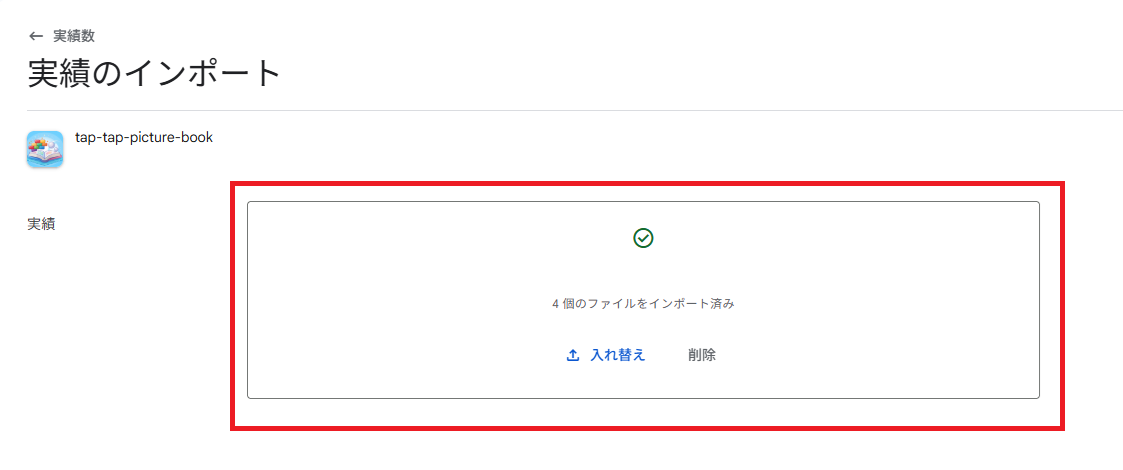
<p>With the locale issue fixed, uploading the ZIP now showed a green checkmark — “4 files imported successfully.”</p>

<figure>
  <img src="/assets/images/posts/gpgs-achievement-import-failure/import-success.png" alt="Play Console import screen showing the uploaded ZIP with a green checkmark and '4 files imported successfully'." />
  <figcaption>The Play Console UI is in Japanese here (my account's console language) — the screenshots below are too, but the text isn't essential to follow along.</figcaption>
</figure>

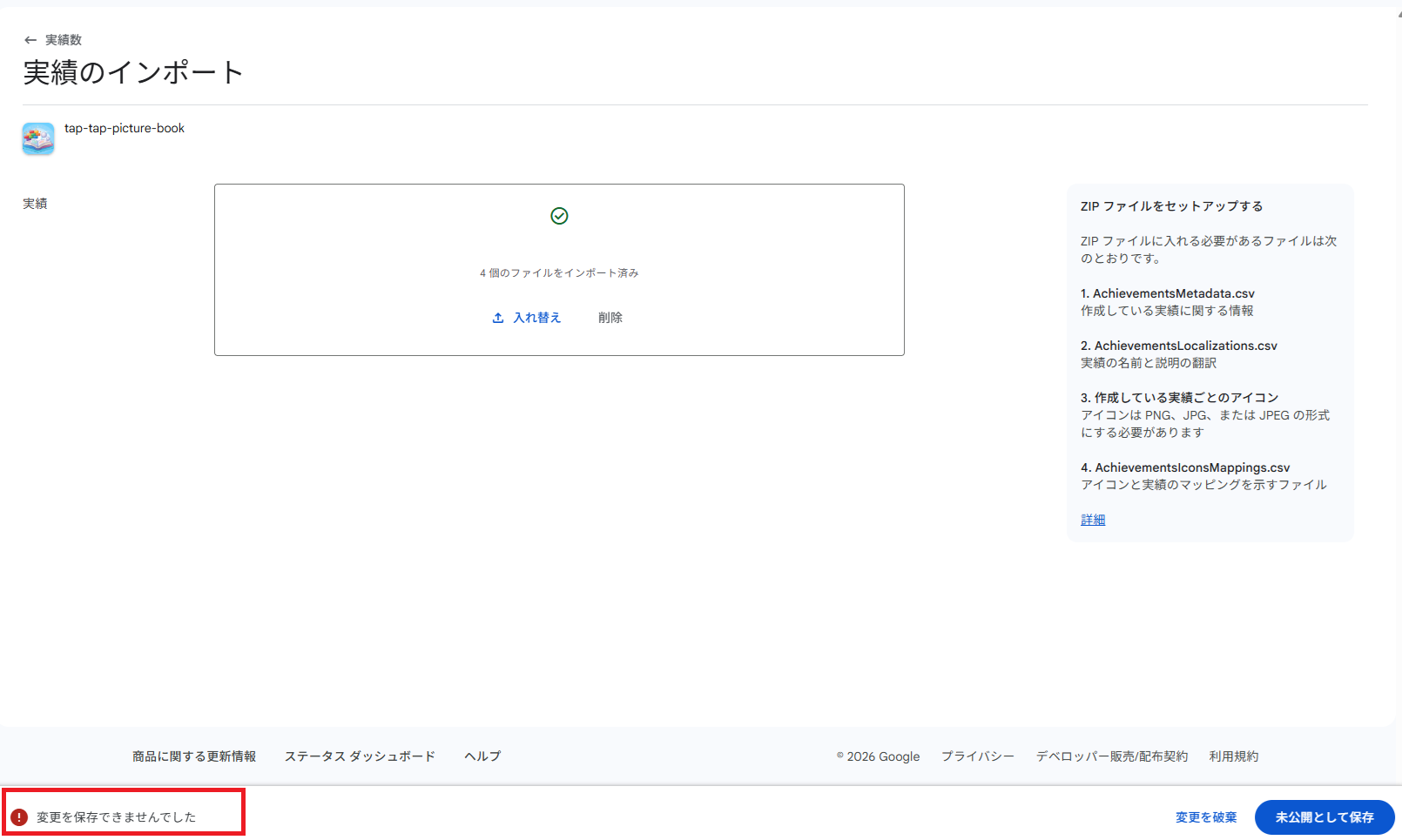
<p>But clicking <strong>Save</strong> produced only:</p>

<blockquote>
  <p>Changes could not be saved.</p>
</blockquote>

<figure>
  <img src="/assets/images/posts/gpgs-achievement-import-failure/save-failed.png" alt="Play Console achievement import page with a red-boxed error banner reading 'changes could not be saved' in the bottom-left corner." />
  <figcaption>No detail, no expandable error — just this banner.</figcaption>
</figure>

<p>Nothing actionable. This is where things got interesting.</p>

<h3 id="ruling-things-out-one-at-a-time">Ruling things out one at a time</h3>

<p>I approached this as a binary search, changing exactly one variable per test:</p>

<ol>
  <li><strong>Scale</strong>: Full 110-achievement ZIP → fails. Reduced to a 2-achievement ZIP → same failure. Ruled out: data volume, and any single bad row among the other 108.</li>
  <li><strong>Icon transparency</strong>: The placeholder icon (reused from the app icon) had an alpha channel. Flattened it to an opaque RGB PNG on a white background, retried the 2-achievement ZIP → same failure. Ruled out: icon transparency.</li>
  <li><strong>Re-verify the spec, verbatim</strong>: Re-fetched the official CSV format documentation and diffed every field against my files:
    <ul>
      <li>column order and no header row</li>
      <li><code class="language-plaintext highlighter-rouge">Name</code> uniqueness</li>
      <li><code class="language-plaintext highlighter-rouge">Points</code> (multiples of 5, 5–200)</li>
      <li><code class="language-plaintext highlighter-rouge">Steps Needed</code> (max 10,000)</li>
      <li>ZIP constraints (file count, size, no subdirectories)</li>
    </ul>

    <p>Everything matched exactly. Ruled out: the CSV format itself.</p>
  </li>
  <li>
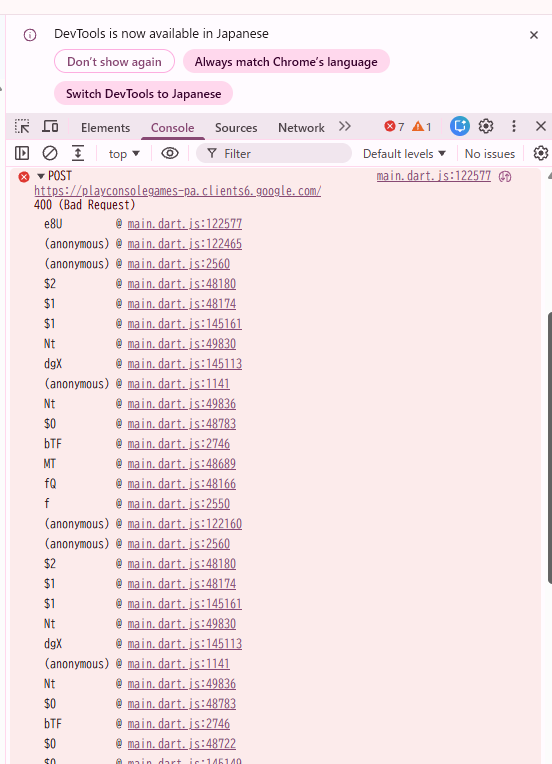
    <p><strong>Open the browser console</strong>: This is where real signal appeared. The failing call was <code class="language-plaintext highlighter-rouge">POST .../achievements:bulkCreate</code> returning HTTP 400.</p>

    <figure>
  <img src="/assets/images/posts/gpgs-achievement-import-failure/devtools-console.png" alt="Chrome DevTools Console tab showing a 400 Bad Request error on a POST to the achievements:bulkCreate endpoint." />
  <figcaption>DevTools Console: the failing bulkCreate call, 400 Bad Request.</figcaption>
</figure>

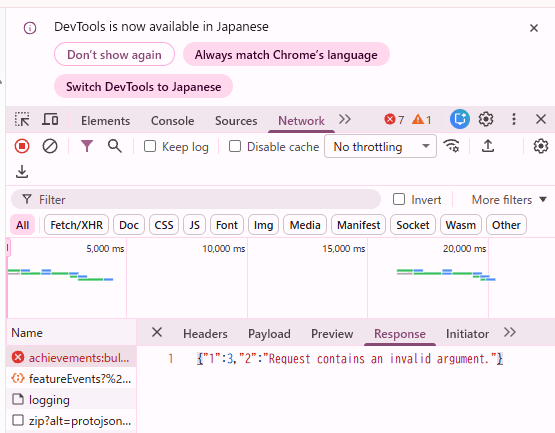
    <p>The response body, decoded from its protobuf-over-JSON encoding, was:</p>

    <div class="language-json highlighter-rouge"><div class="highlight"><pre class="highlight"><code><span class="p">{</span><span class="nl">"1"</span><span class="p">:</span><span class="mi">3</span><span class="p">,</span><span class="nl">"2"</span><span class="p">:</span><span class="s2">"Request contains an invalid argument."</span><span class="p">}</span><span class="w">
</span></code></pre></div>    </div>

    <figure>
  <img src="/assets/images/posts/gpgs-achievement-import-failure/devtools-network-response.png" alt="Chrome DevTools Network tab Response pane showing the raw JSON body: {&quot;1&quot;:3,&quot;2&quot;:&quot;Request contains an invalid argument.&quot;}" />
  <figcaption>DevTools Network tab: the raw response body behind that error.</figcaption>
</figure>

    <p>Field <code class="language-plaintext highlighter-rouge">1: 3</code> is the gRPC status code for <code class="language-plaintext highlighter-rouge">INVALID_ARGUMENT</code>. Field <code class="language-plaintext highlighter-rouge">2</code> is a human string — but a completely generic one. Still no field-level detail.</p>
  </li>
  <li>
    <p><strong>Strip down to the essentials</strong>: Both <code class="language-plaintext highlighter-rouge">AchievementsLocalizations.csv</code> and <code class="language-plaintext highlighter-rouge">AchievementsIconsMappings.csv</code> are optional per spec. I built a ZIP with <em>only</em> <code class="language-plaintext highlighter-rouge">AchievementsMetadata.csv</code>, one achievement, no icon at all (the row below is an example test row):</p>

    <div class="language-plaintext highlighter-rouge"><div class="highlight"><pre class="highlight"><code>First Step,Clear 1 stage,True,1,Revealed,5,10
</code></pre></div>    </div>

    <p>Still failed, identically. This ruled out localization and icon files entirely — the bug had to be in <code class="language-plaintext highlighter-rouge">AchievementsMetadata.csv</code> itself, or somewhere outside the file altogether.</p>
  </li>
  <li><strong>Sanity check: can this project create achievements at all?</strong> I tried creating a single achievement manually through the Play Console UI (no CSV involved). The save button threw a generic, unrelated-looking “An unexpected error occurred” toast — but refreshing the list showed the achievement had actually been created. This confirmed the project itself wasn’t blocked; the problem was specific to the bulk-import (<code class="language-plaintext highlighter-rouge">bulkCreate</code>) code path.</li>
  <li>
    <p><strong>The actual culprit</strong>: Comparing my one remaining test row against what a “normal” quick-created achievement probably looks like, I suspected the combination of <code class="language-plaintext highlighter-rouge">Incremental value = True</code> with <code class="language-plaintext highlighter-rouge">Steps Needed = 1</code>. I tested each combination with the row otherwise unchanged:</p>

    <table>
      <thead>
        <tr>
          <th><code class="language-plaintext highlighter-rouge">Incremental value</code></th>
          <th><code class="language-plaintext highlighter-rouge">Steps Needed</code></th>
          <th>Save result</th>
        </tr>
      </thead>
      <tbody>
        <tr>
          <td><code class="language-plaintext highlighter-rouge">True</code></td>
          <td><code class="language-plaintext highlighter-rouge">1</code></td>
          <td>Failed</td>
        </tr>
        <tr>
          <td><code class="language-plaintext highlighter-rouge">False</code></td>
          <td>(blank)</td>
          <td>Succeeded</td>
        </tr>
        <tr>
          <td><code class="language-plaintext highlighter-rouge">True</code></td>
          <td><code class="language-plaintext highlighter-rouge">50</code></td>
          <td>Succeeded</td>
        </tr>
      </tbody>
    </table>

    <p>That pinned it down precisely:</p>

    <ul>
      <li><strong>The rule:</strong> <code class="language-plaintext highlighter-rouge">bulkCreate</code> silently rejects any achievement where <code class="language-plaintext highlighter-rouge">Incremental value</code> is <code class="language-plaintext highlighter-rouge">True</code> and <code class="language-plaintext highlighter-rouge">Steps Needed</code> is <code class="language-plaintext highlighter-rouge">1</code>.</li>
      <li><strong>Documented?</strong> No — this constraint appears nowhere in the official documentation.</li>
      <li><strong>Likely reason:</strong> a single-step “incremental” achievement is functionally identical to a non-incremental one, so the backend probably rejects it as a degenerate case.</li>
      <li><strong>Why it’s hard to find:</strong> the API gives no indication, and the UI’s generic “invalid argument” error is effectively undiscoverable without decoding the raw network request.</li>
    </ul>
  </li>
</ol>

<h3 id="the-fix">The fix</h3>

<ul>
  <li><strong>The affected achievements:</strong> 23 of my 110 were “do this once” achievements (first stage clear, first world clear, first ad watched, etc.) modeled as incremental with a target of 1 step — exactly the pattern that triggers this bug.</li>
  <li><strong>The change:</strong> converting all 23 to non-incremental achievements (<code class="language-plaintext highlighter-rouge">Incremental=False</code>, blank <code class="language-plaintext highlighter-rouge">Steps Needed</code>) fixed the import completely.</li>
  <li><strong>A better design anyway:</strong> a “do it once” achievement doesn’t need step tracking. Unlocking it directly with <code class="language-plaintext highlighter-rouge">unlock_achievement()</code> instead of <code class="language-plaintext highlighter-rouge">set_achievement_steps()</code> is the correct behavior, and it also avoids the undocumented validation rule.</li>
</ul>

<figure>
  <img src="/assets/images/posts/gpgs-achievement-import-failure/achievements-list.png" alt="Play Console achievements list showing all imported achievements (First Step, Breaker Novice, Breaker Veteran, and more) with unpublished status, ready to review and publish." />
  <figcaption>All 110 achievements imported successfully after the fix.</figcaption>
</figure>

<h2 id="takeaways">Takeaways</h2>

<ul>
  <li><strong>Generic upload success ≠ generic save success.</strong> Play Console’s CSV importer validates <em>file format</em> on import, but a separate, much less transparent validation pass runs when you actually save — and it can reject perfectly spec-compliant data for reasons the UI won’t tell you.</li>
  <li><strong>When an error gives you nothing, open DevTools.</strong> The Console tab told me <em>which</em> API call was failing; the Network tab’s response body told me <em>why</em> (in gRPC-status-code form, at least). Neither would have been discoverable from the Play Console UI alone.</li>
  <li><strong>Binary search beats guessing.</strong> Cutting the achievement count, then the icon, then the auxiliary CSVs, then the specific field combination, each ruled out one axis of the problem — and each test took minutes, versus hours of speculating.</li>
  <li><strong>“Supported by the game” is not the same as “supported by Play.”</strong> Locale/region support in particular is scoped per-project, not globally — always check the live configuration screen, not the general reference table.</li>
</ul>]]></content><author><name>Crobmaster</name><email>crobmaster@gmail.com</email></author><category term="android" /><category term="android" /><category term="google-play-games" /><category term="debugging" /><summary type="html"><![CDATA[A GPGS achievement ZIP passed validation but silently failed to save — the cause turned out to be an undocumented bulkCreate validation rule.]]></summary><media:thumbnail xmlns:media="http://search.yahoo.com/mrss/" url="https://crobmaster.github.io/assets/images/posts/gpgs-achievement-import-failure/achievements-list.png" /><media:content medium="image" url="https://crobmaster.github.io/assets/images/posts/gpgs-achievement-import-failure/achievements-list.png" xmlns:media="http://search.yahoo.com/mrss/" /></entry></feed>