 Crob Apps Dev Blog
Identical Achievement Icons Block Publishing on Google Play Games
The short version fits in three bullets:
- If every achievement shares the same icon, publishing your Play Games Services configuration is blocked outright. Not a warning — the button is disabled.
- Icons are editable afterwards, including after publishing — but only one achievement at a time, by hand, in Play Console.
- Every bulk path is closed. Bulk import is create-only, and the Publishing API explicitly ignores writes to
iconUrl.
I didn’t know any of that when I bulk-imported 110 achievements for Tap Tap Picture Book pointing at a single placeholder icon, and I found out at the last step before publishing. Getting out of it cost me every achievement ID and a re-release of the app.
This is the sequel to Debugging a Silent Google Play Games Services Achievement Import Failure, which covers getting the same bulk import to succeed in the first place.
Where it went wrong
I created all 110 achievements through the bulk-import CSV flow, and deliberately deferred the icons: every row pointed at the same placeholder PNG, a recolored copy of the app icon. My reasoning was that icons are cosmetic and editable later in Play Console, without redistributing the app.
That part was correct. What I hadn’t checked was whether the placeholder state itself was allowed to exist.
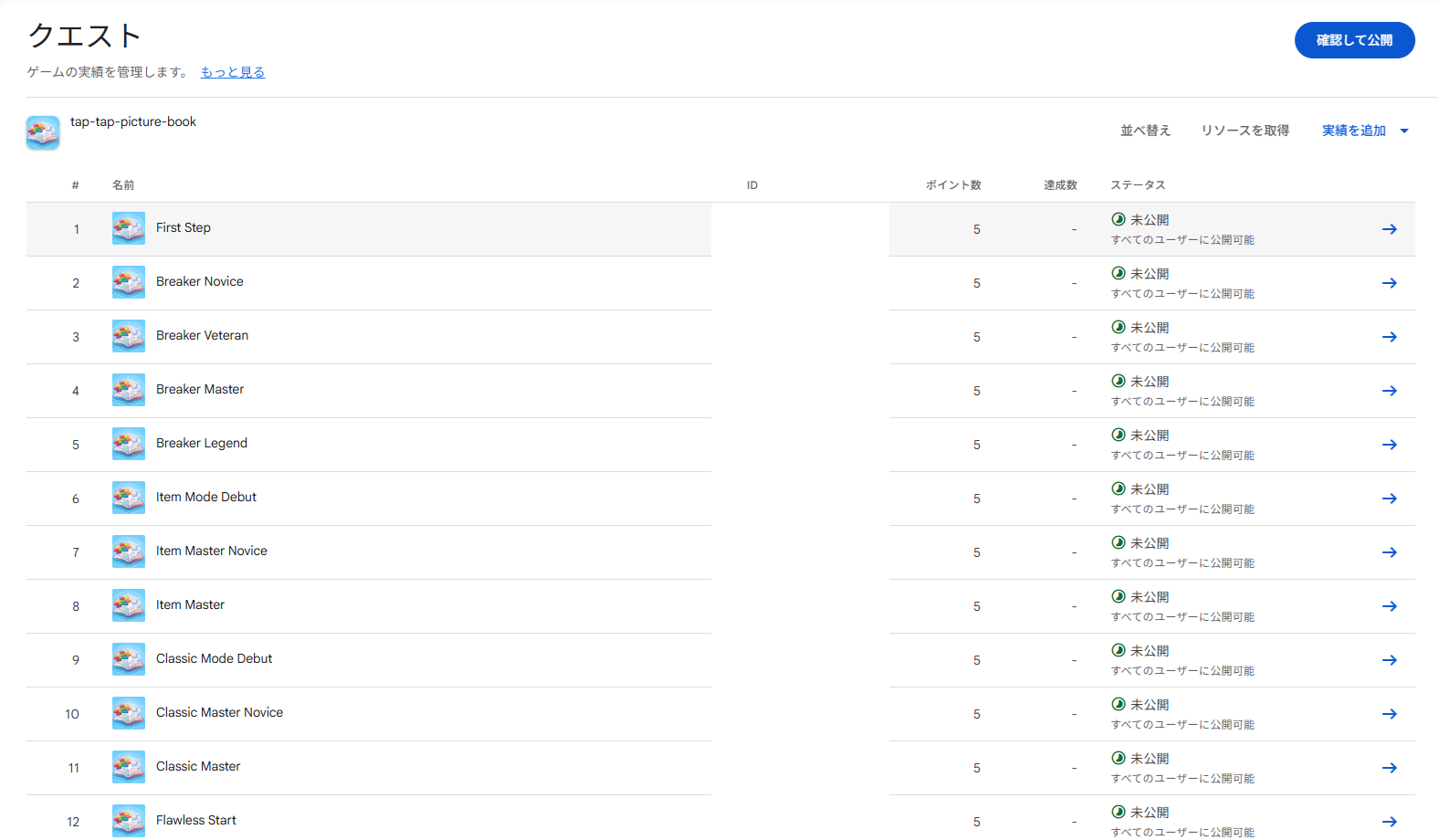
Implementation went fine. Device testing went fine. Closed testing went fine. Then I opened the publish screen for the final step and found this:
Quests Action required: 110 items
The same icon is used for multiple achievements. Specify a different icon for each achievement.
And the Publish button was disabled. Not a warning — a hard block.
So the icons weren’t a cosmetic detail I could finish after launch. They were a precondition for launching at all, and I now needed to fix 110 of them.
Looking for a bulk fix
What I wanted was to replace 110 icons in one operation. I tried three routes; the first two don’t exist, and the third only works one achievement at a time.
Route 1: re-upload a bulk ZIP with only the icons
A bulk achievement import is a ZIP containing four kinds of file:
AchievementsMetadata.csv        achievement definitions
AchievementsLocalizations.csv   per-language names and descriptions
AchievementsIconsMappings.csv   achievement name -> icon filename
achievement_*.png               the icons (flat, at the ZIP root)
Because the icon mapping is its own separate file, it looks like you could re-upload just that piece. You can’t:
There are errors in the ZIP file Missing file — add AchievementsMetadata.csv to the ZIP file
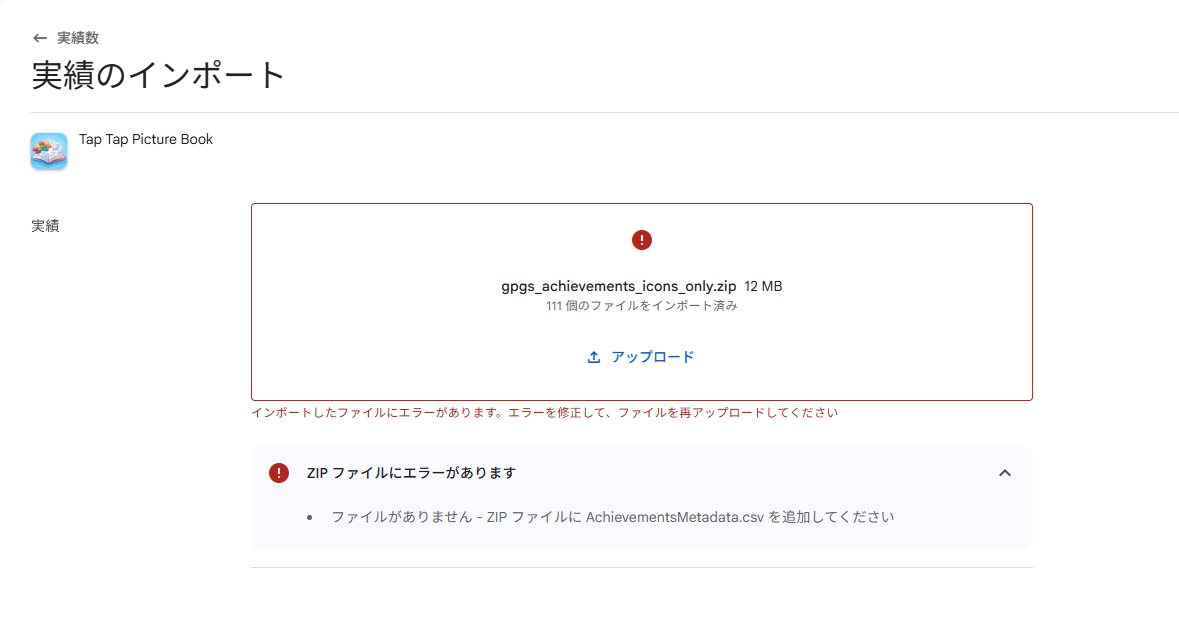
The metadata file is mandatory. So include everything — metadata, localizations, mappings, icons — and upload the complete ZIP instead:
There are errors in AchievementsMetadata.csv Duplicate name — Achievement First Step / Breaker Novice / Breaker Veteran / … (110 rows)
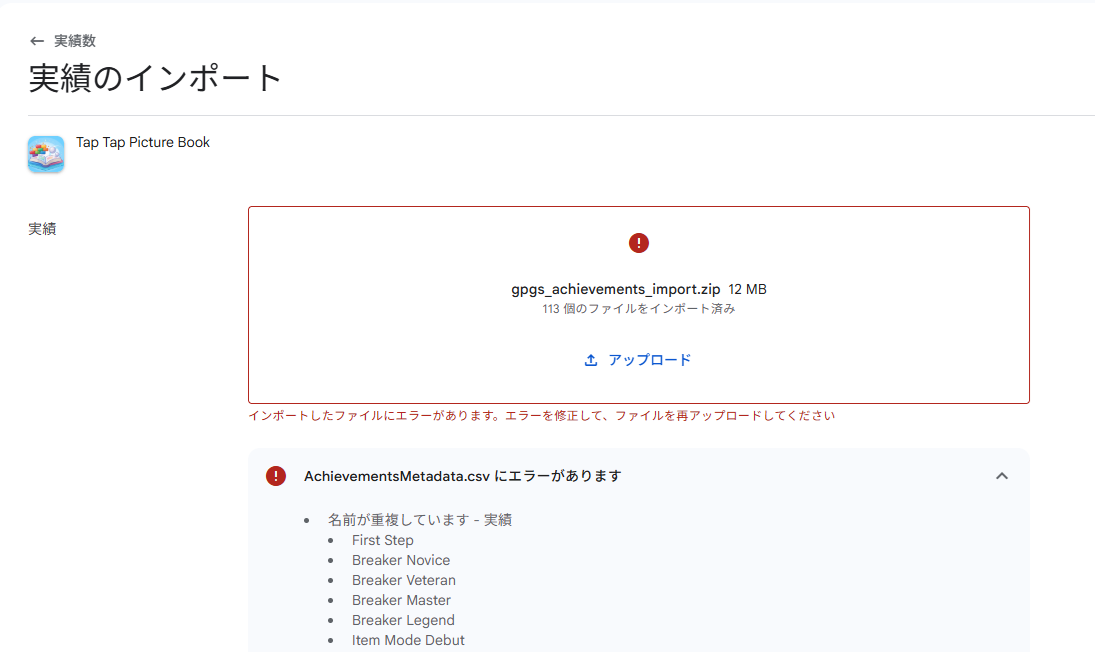
Bulk import is create-only. If a name collides with an existing achievement, the whole upload is rejected.
Route 2: the Publishing API
Play Games Services has a Publishing API, and its overview page still advertises “uploading images for achievement and leaderboard icons.”
Fetch the current discovery document, though —
https://gamesconfiguration.googleapis.com/$discovery/rest?version=v1configuration
— and that method isn’t there. What remains is achievementConfigurations (insert / get / delete / list / update) and leaderboardConfigurations. The image-upload endpoint is gone.
The obvious fallback is to set iconUrl through achievementConfigurations.update. The schema answers that directly:
iconUrl: The icon url of this achievement. Writes to this field are ignored.
Writes are ignored. There is no API path to an achievement icon.
Route 3: edit each achievement by hand in Play Console
This one works. It keeps working after you publish, too — icons aren’t frozen, they’re just not scriptable. The catch is the multiplier: 110 achievements, 110 visits to the icon picker.
What I chose
Deleted all 110 achievements and recreated them with icons attached, rather than clicking through 110 icon pickers.
That decision has a consequence that isn’t obvious until you’re in it. Recreating through bulk import only works if nothing collides, so every one of the old 110 has to be gone first — and Play Console has no bulk delete either. Choosing the scripted path for the icons is what forced me into the Publishing API for the deletion. The script wasn’t an optimization; it was the only way to carry out the decision at all.
First, of course, I had to produce a full set of 110 icons, no two of them identical as images — that’s the rule that started all of this. With those in hand, the rest was mechanical.
1. Delete the existing 110
Bulk import refuses to touch anything that already exists, so all 110 have to be gone before they can be recreated. Play Console deletes one achievement at a time, which puts this step right back where the icon problem was — so the Publishing API it is:
DELETE https://gamesconfiguration.googleapis.com/games/v1configuration/achievements/{achievementId}
scope: https://www.googleapis.com/auth/androidpublisher
Enable the Publishing API in Google Cloud Console, create a desktop-app OAuth client, and feed it the achievement_id values — which the app already has hardcoded, so no lookup is needed.
One snag: fire them off back-to-back and it stops around the 80th.
FAILED achievement_XXX 403 {"error": {"code": 403,
  "message": "Rate Limit Exceeded", ... "reason": "rateLimitExceeded"}}
done ok=81 skipped=0 failed=29
81 deletes before the limit kicked in. Adding retry-on-403 with a wait and rerunning against just the leftovers cleared them:
token acquired, deleting 29
deleted achievement_XXX
deleted achievement_XXX
...
deleted achievement_XXX
done ok=29 skipped=0 failed=0
There’s no need to throttle every request up front — waiting and retrying only when you actually hit the limit is enough.
Worth noting: this whole step has a deadline attached. After Play Games Services is published, achievements can’t be deleted at all, so the delete-and-recreate route stops existing.
2. Recreate, then swap every ID
Uploading the icon-bearing ZIP creates all 110 fresh. No duplicate-name error this time, since nothing is left to collide with.
And every achievement_id changes. They share a long common prefix, so at a glance the new list looks like the old one — only the short tail differs, and that tail is what gets reassigned:
First Step (old) XXX...WQ
First Step (new) XXX...yAE
Pull the generated resource file (games-ids.xml) from Play Console and replace all 110 ID definitions on the app side.
This is where the real cost lands. Any build already in distribution now reports achievements under IDs that no longer exist, so every unlock silently fails. The closed-testing build I’d just shipped was effectively dead the moment the old achievements were deleted. Only after cutting a new version with the updated IDs could I finally publish.
What I’d do differently
Prepare the icons before creating the achievements. That’s the whole lesson. Bulk import is instant, and that instant is the only moment where icons come along for free. Skip it and there is no cheap way back.
Skipping that step cost:
- producing 110 distinct icons anyway, just later,
- deleting all 110 achievements through the Publishing API, since Play Console has no bulk delete,
- replacing 110 achievement IDs in the app,
- rebuilding and re-releasing the app,
- losing every achievement unlock from testing so far.
Timing makes it worse. Once Play Games Services is published, achievements can’t be deleted at all, so recreating them in bulk stops being possible — and one-at-a-time edits in Play Console become the only way to fix an icon.
For reference, here’s what’s editable after creation:
| Item | Changeable after creation |
|---|---|
| Icon | Yes — one at a time in Play Console, never in bulk |
| Name, description | Yes |
| Points, ordering | Yes |
| Adding achievements | Yes |
| Deleting achievements | Only before publishing |
Released app

Tap Tap Picture Book
Break bricks made of picture book art in this casual arcade adventure!